Help Center
Help Videos for TradingView Scripts
If, after viewing the help videos, you need extra help, please contact us via email on support@MTPredictor.com.
QuickStart Guide
Introduction to MTPredictor for TradingView
- – Video 39 mins
- – Video 40 mins
- – Video 50 mins
Using the MTP Scripts
- – Video 19 mins
- – Video 16 mins
- – Video 20 mins
- – Video 20 mins
- – Video 20 mins
- – Video 20 mins
- – Video 12 mins
- – Video 20 mins
- – Video 20 mins
- – Video 20 mins
Using the MTP Scripts (Older Videos)
- Adding the Analysis to a MTP automatic setup – Video 5 mins
- How to use the DP (Decision Point) Script – Video 6 mins
- How to use the manual Risk/Reward Script – Video 4 mins
- How to use the Elliott Wave Script – Video 4 mins
- How to use the WPT (Wave Price Target) Script – Video 7 mins
Tips and Tricks
- Getting the DP Pivot Point onto Today’s Date – Video – 2mins
- Adding Alerts for the Markets and time frames you follow – Video 3 mins
Also:
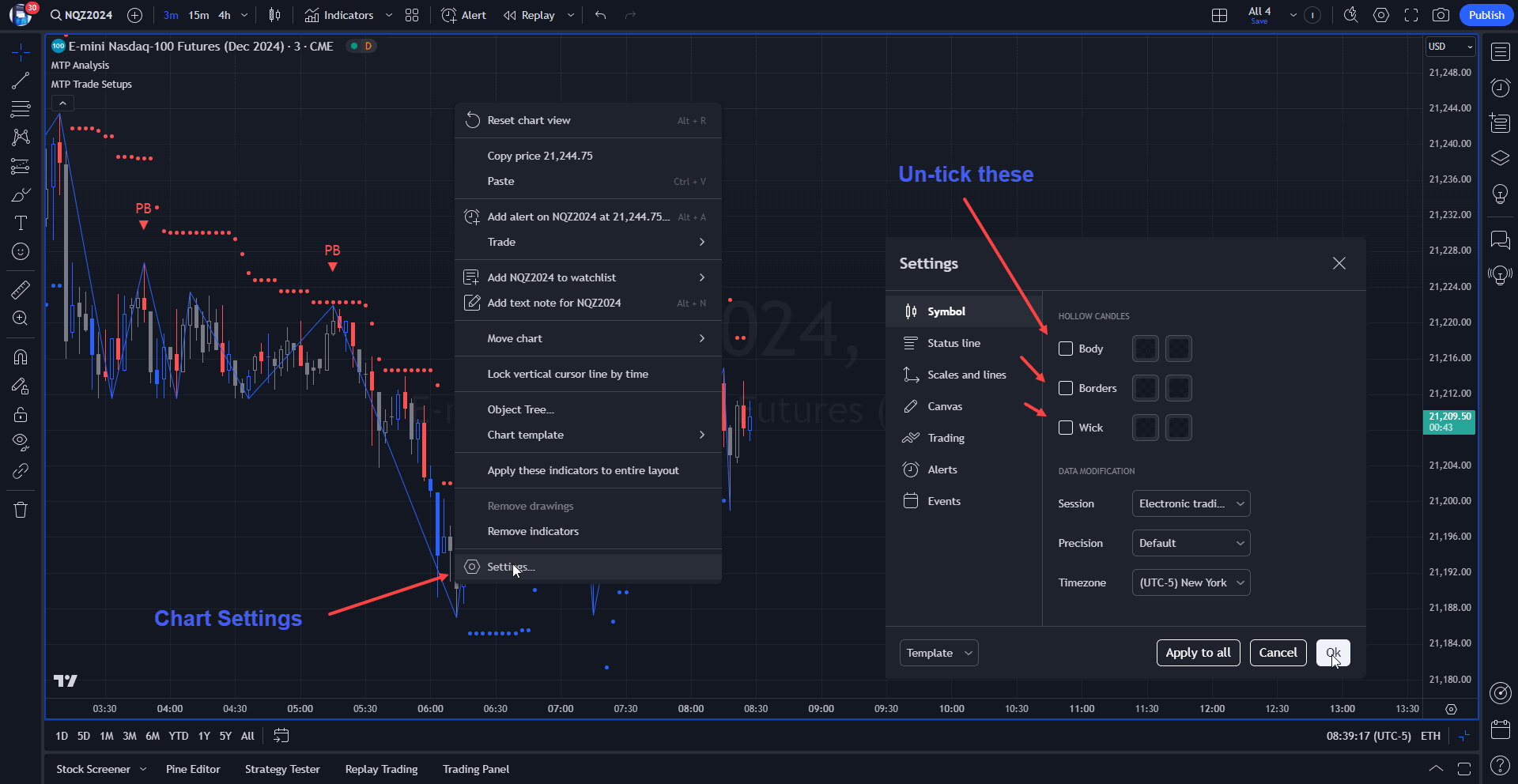
For the cleanest Chart, let our MTP Analysis Script “paint” the Chart Candles for you. To do this, first go to your Chart Settings, then “un-tick” the Bar display options. Please see the chart below.
Note:
Please remember that although MTPredictor has automatic setups, we do not suggest that you just follow these blindly as if it were a black box mechanical system, judgement is needed in filtering the automatic setups, particularly with respect a clear larger degree trend. Each Trader must take responsibility for deciding on whether their own Analysis is clear and fits in with their own (personal and unique) Trading Plan.