MTPredictor
Software Versions
Resources
Support
Pricing
About Us
Contact Us
Login

Risk Disclaimer and Disclosure Statement

No offer or solicitation to buy or sell securities, securities derivative, futures products or off-exchange foreign currency (Forex) transactions of any kind, or any type of trading or investment advice, recommendation or strategy, is made, given or in any manner endorsed by any MTPredictor, or anybody associated with MTPredictor. Past performance, whether actual or indicated by historical results, is no guarantee of future performance or success. There is a possibility that you may sustain a loss equal to or greater than your entire investment regardless of which asset class you trade (Equities, Options Futures or Forex); therefore, you should not invest or risk money that you cannot afford to lose. Please read the full Risk Disclaimer and Disclosed and Terms and Conditions. All examples on this website should be considered as hypothetical. Unique experiences and past performances do not guarantee future results. Testimonials herein are unsolicited and are non-representative of all clients. Hypothetical performance results have many inherent limitations, some of which are described below. no representation is being made that any account will or is likely to achieve profits or losses similar to those shown; in fact, there are frequently sharp differences between hypothetical performance results and the actual results subsequently achieved by any particular trading program. One of the limitations of hypothetical performance results is that they are generally prepared with the benefit of hindsight. In addition, hypothetical trading does not involve financial risk, and no hypothetical trading record can completely account for the impact of financial risk of actual trading. for example, the ability to withstand losses or to adhere to a particular trading program in spite of trading losses are material points which can also adversely affect actual trading results. There are numerous other factors related to the markets in general or to the implementation of any specific trading program which cannot be fully accounted for in the preparation of hypothetical performance results and all of which can adversely affect trading results.

While MTPredictor has automatic setups, it is not a Black box to be followed blindly: Judgement is needed in filtering the automatic setups, particularly with respect a clear larger degree trend. All trade decisions are your own sole responsibility.

There is a risk in Trading and Investing. Losses can and will unfold.

MTPredictor

About Us

Background

Steve Griffiths

Steve on TV

SUPPORT

Help Centre

Customers Area

Contact Us

Software Versions

NinjaTrader

Trading View

Standalone

Testimonials

Awards and Reviews

Copyright © 2026 MTPredictor. All rights reserved.

Privacy

Terms

Manage Your MTPredictor Licence in NinjaTrader 8

Managing your Software Licence for NinjaTrader 8

(Build 8.5.3.0 or earlier, does not apply to Build 8.6.0.1 or later)

MTPredictor can be installed on 3 PC’s at the same time. To help you mange your MTPredictor licences for NinjaTrader 8 please follow the steps below.

First go to the NT8 Control Panel, then Tools > MTPredictor > Registration:
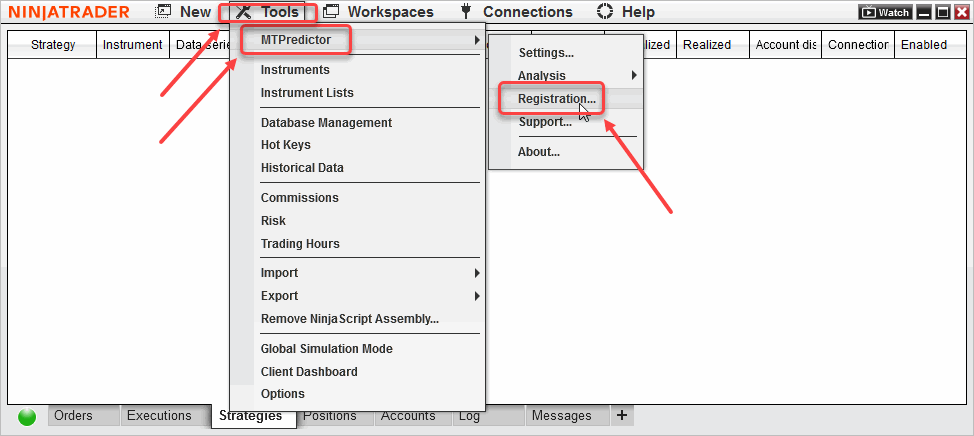
Manage nt8  One

This will open our Licence Management Window:
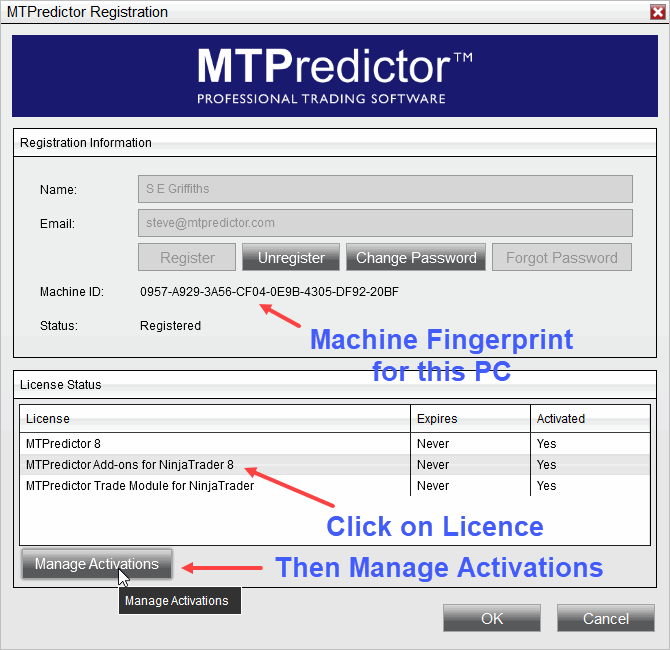
Manage nt8 Two

The first thing to note is the “Machine ID”, this is the ID that associates our MTPredictor Licence to this PC. Please do not confuse this with the NinjaTrader 8 ID as these are different and not not related to each other at all. (Perhaps we will rename this “Machine Fingerprint” to avoid confusion in the future) .

This identifies the current PC on which MTPredictor is registered.

Deregister an old PC.

To deregister an old PC (or an old registration”fingerprint”), fist click on the Licence you wish to Manage then click on “Manage Activations”.

This will bring up another Window:
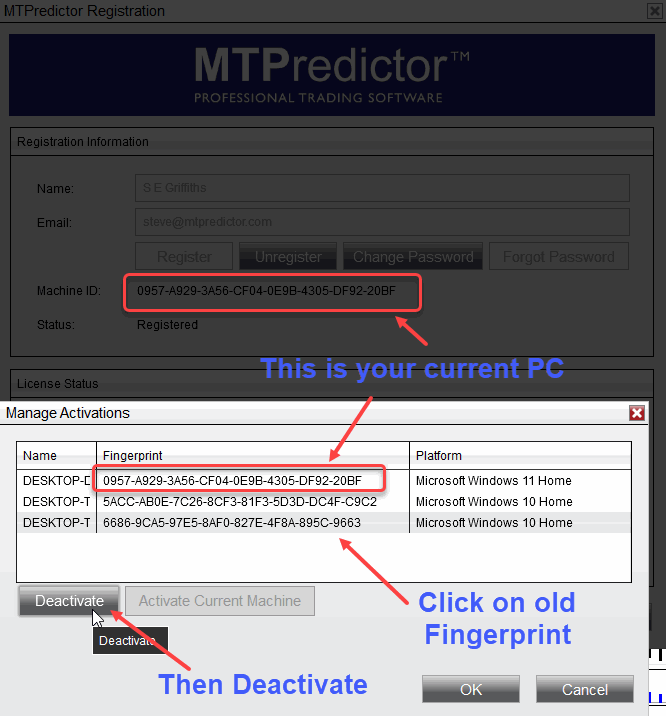
Manage nt8 three

This is where you can see the PC’s (or Fingerprints) that MTPredictor is currently registered on.

You can now select an old PC (or old fingerprint), then click “Deactivate”

This will deregister MTPredictor on that old PC.

Note: it is a good idea to drag this Window down a bit so you can see the “Machine ID” (or Machine Fingerprint) of the current PC, so you know which Fingerprint (or PC) to Deactivate.

Trade Module

If you also have the MTP Trade Module, then you need to repeat this process again for the Trade Module Activation:
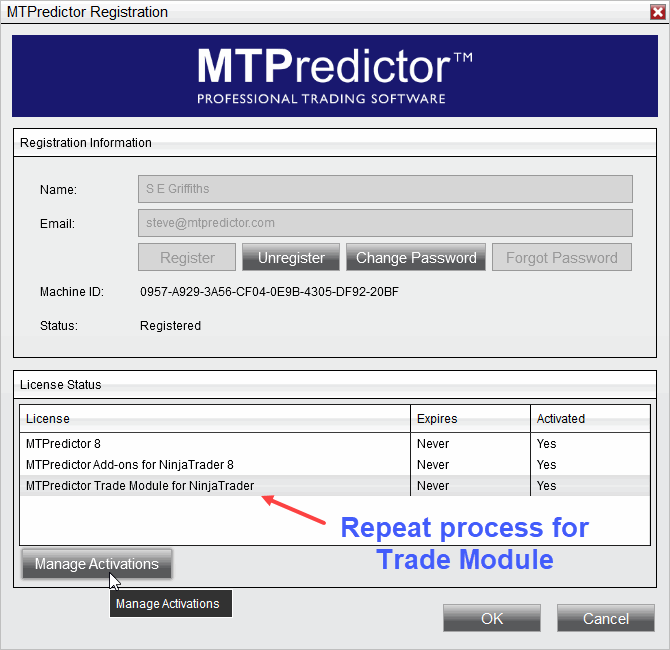
Manage nt8 four

That should complete the process.

Note:

Please remember that although MTPredictor has automatic setups, we do not suggest that you just follow these blindly as if it were a black box mechanical system, judgement is needed in filtering the automatic setups, particularly with respect a clear larger degree trend. Each Trader must take responsibility for deciding on whether their own Analysis is clear and fits in with their own (personal and unique) Trading Plan.